
Distribution mirroring the collection's historical data.
The problem
Distribute thousands of copies across thousands of points of sale. Every cycle.
Once the print run is decided, the publisher must answer a practical question: how to distribute the copies across all channels and all points of sale? A sales agent manages thousands of active points of sale (mass retail, bookstores, supermarkets, online).
Manually distributing thousands of copies per title, per channel, per client, every cycle often done with ageing systems, possibly tweaked in Excel, a source of errors and massive time loss.
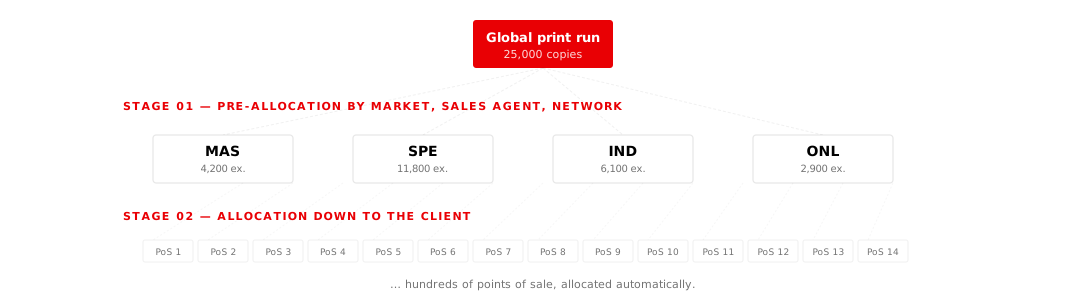
The module operates in 2 sequential stages
Pre-allocation, then allocation. From global down to point of sale.
Stage 01
Pre-allocation split by distribution channel.
Pre-allocation splits the global objective across the main distribution channels. At this stage, the distributor sets, from the global objective, their per-market and per-network objectives, taking each channel's absorption capacity into account.
| MAS |
Mass retail (Tesco, Carrefour, Walmart) |
|---|---|
| SPE |
Specialised superstores (Fnac, Cultura) |
| IND |
Independent stores (Independent bookstore network) |
| ONL |
Online sales (Amazon, Fnac.com, publisher sites) |
Stage 02
Allocation - down to the end client.
Allocation goes down to the end client each chain or point of sale individually. This is where DemandSens really shines: this distribution work, which would take days in Excel, is automated.
Manual adjustment
Distribution hierarchy
Sales Agent → network → sub-network or chain → individual point of sale.
At any level, the user can manually adjust the allocation for strategic clients, without disrupting the rest of the distribution.
6 configurable allocation modes.
The user can allocate using 6 different logics, depending on what is most relevant for the title at hand.
-
1.
By collection
-
2.
By division
Distribution following the editorial division's rules.
-
3.
By publisher
Distribution following the publisher's global practices.
-
4.
By series
Distribution mirroring previous tomes in the series.
-
5.
By region
Geographical distribution (regions/departments).
-
6.
By comparable net sales
Distribution mirroring the net sales of a reference title.
Allocate · in one sentence
From global print run to point of sale, in a few clicks.
Thousands of points of sale, allocated automatically.
Your collection rules, applied to every new title.
To be clear
What this module does not do.
✗ It does not replace the commercial relationship between KAMs and chains.
✗ It does not handle physical logistics this is not a WMS.
For whom?
-
Sales director · Distribution director
Allocation consistency across imprints, time saved on cycles, alignment with KAMs.
Decision-maker persona · buyer -
KAM · Sales analyst
Prepare a cycle allocation in hours, not days. Adjust strategic clients.
User persona · operator